
If you’re a website owner, you’re probably familiar with the concept of ADA website accessibility. Mainly, they are a set of rules that mandate modern websites to facilitate access for differently-abled people.
Yes, just like us, differently-abled people also need to access the internet every now and then. But unfortunately, many factors make our regular websites inaccessible to them.
Believe it or not, around 26% of adults in the US have a disability that keeps them from using websites on the internet. These include visual, auditory, cognitive, and various other disabilities.
So, if you want to save your business from legal actions while maintaining an ethical standpoint, then follow these seven steps for web accessibility.
Why Add Web Accessibility Features to Your Website?

Adding web accessibility to your website by complying with ADA and WCAG regulations isn’t simply a legal requirement. Making your website accessible brings various tangible and non-tangible benefits to your business.
First of all, the primary reason you integrate web accessibility into your website is its ethical context. You see, using the internet is no longer a leisure prospect. With everything from essential items to government forms and facilities on the internet, disabled people have a fundamental right to access these contents easily.
In terms of revenue, you’re missing out on a massive chunk of potential customers if disabled people can’t access your website. There are currently around 54 million disabled people in the US. Together, they represent an income of $1 trillion and approximately $220 billion in spending power.
So, apart from the ethical context of web accessibility, you should give it a thought for sole business reasons. Moreover, after the advent of the ADA and WCAG regulations, your website can become liable for legal action if it does not meet the required guidelines.
Apart from avoiding any legal actions, complying with these guidelines can also help your business in other ways. It will enhance your brand reputation and help improve the overall customer experience.
Additionally, it will help introduce your brand identity and convey your message effectively without any barriers. Similarly, you can submit new technologies and creative content to your website.
Overall, all these aspects together are beneficial if you’re targeting long-term growth for your business. The best part is that it is not that difficult to integrate web accessibility into your website.
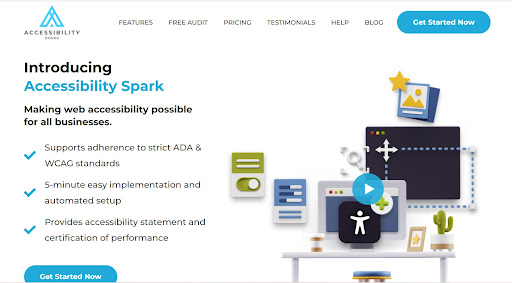
Platforms such as Accessibility Spark provide an effortless transition for your website to make it accessible for people with various disabilities. All you have to do is integrate its tools into your website for a nominal subscription fee. You’ll get a commendable ROI and build your reputation as a socially-aware brand.
If you’re up for making a positive change while directing maximum traffic towards your website, these tips will help you out.
Tips 1 – Include ALT Tags
Most people with visual impairments and disabilities use screen readers to understand web content. To ensure your website works well for people who use screen readers, you should add ALT tags to all the images on your website.
This way, the screen reader can easily detect the content in your images and let differently-abled people understand their context. For example, if there is some text in the picture, that text should also be included as ALT text.
However, if the image is solely used for decoration purposes and does not add any other value to the content, you can skip that, so it does not distract users from the original content.
While adding tags will help people with visual disabilities access your website, it will also enhance the SEO for your website. That’s because search engines process text better than images. So, if each image on your website has ALT text attached to it, it will rank well on relevant web searches.
Plugins on WordPress, Joomla, and Drupal let you quickly add ALT tags to your images, even if you don’t have any coding knowledge.
Tips 2 – Add Descriptions to Your Links
Adding descriptions to all the links on your website can quickly help people with cognitive disabilities understand their purpose. Similarly, it also lets screen readers understand their meaning effectively without seeking additional help.
To get some perspective, put yourself in the shoes of a visually-impaired person using an automatic screen reader. While you’re browsing a website, hearing ‘click here’ is just not enough information to understand the use of a particular button.
Instead, you should replace this message by adding where the button leads to. For example, you can add further descriptions such as ‘click here to make a purchase.’
Similarly, this technique can also be applied to other links on the website. Such as, your section titled ‘products’ should be replaced with ‘click here to browse through our products.’ Similarly, a simple ‘about us’ link could be described as ‘ go to this link to read more about our brand.’ These descriptions provide context to the link and let people access your website quickly using screen readers.
Tips 3 – Change Your Color Scheme

Color deficiency is one of the most common types of visual impairment. More than 8% of the US population faces difficulty processing red and green colors. If your website consists of only these colors, it can get challenging for such people to understand your content.
Similarly, using a calming and soothing color scheme can quickly help people with learning disabilities process your content. But, again, the best way is to use a combination of colors rather than sticking to a single color scheme.
Besides that, use other markers with the color scheme, such as asterisks and question marks. This helps cognitively disabled people distinguish one block of content from another.
You can use tools like Accessibility Spark to evaluate your color scheme and see which parts of your website can be challenging to access for disabled people.
Tips 4 – Design Accessible Forms
Filling out forms is one of the most tedious tasks on a website, even for entirely abled people. So one of the best things you can do to make your website accessible is to design them, keeping various disabilities in mind.
There are many ways you can make forms easier to process for people with disabilities. For starters, you can identify the focus fields clearly to help them prioritize them over others. Similarly, make sure your form is accessible through the keyboard and helps them navigate through multiple areas until the submit button.
Moreover, the relationship between the labels and blanks should be identified, and features such as date-pickers should be replaced with manual blanks. In the end, you should allow the visitors to go back to the form and edit it before submitting it.
Tips 5 – Facilitate Keyboard Navigation
People who use Braille keyboards to browse the internet will find your website accessible if you provide keyboard navigation on your website. Apart from people with visual impairments, this feature can also help people who prefer to use the keyboard.
Key elements on your website should be accessible through basic keyboard commands. These include form fields, widgets, CTA, menu items, and anchor texts. Some website builders come with plug-ins to help support such navigation so that visitors don’t necessarily need a mouse to browse your site. However, make sure you simplify the keyboard navigation to match the flow you would achieve with a mouse. For example, instead of clicking a tab multiple times to skip the blanks on a form, there should be specific shortcuts to help people neglect their desired blank.
Tips 6 – Simplify Dynamic Content
Dynamic content adds extra oomph to your website but can be difficult for people with disabilities to process. In addition, if the site reloads, these content blocks can change, and screen readers do not always detect this phenomenon. This means that your users will miss out on new content.
Adding ARIA landmarks can help you simplify dynamic content. In addition, these landmarks help screen readers identify the content as it changes and make it accessible to disabled people. Moreover, ARIA markers also help users navigate effortlessly through the content and skip directly to their desired parts. This way, they can easily find what they need and avoid the frustration of moving through every inch of the website to see what they need.
Tips 7 – Ask Differently-Abled People for Help
While there are many discussions regarding how websites can be made accessible for disabled people, the best way to find out innovative processes is to include them in the debate.
If you want to make your website disability-friendly, you should reach out to them and ask them what they need. Then, upon finding out the issues these people face on websites, you can use technology to develop innovations to help them out.
Similarly, when you develop ideas to improve web accessibility, you can ask them to test your features to see if they eliminate the problem. This way, you can use the functionality of your feature before permanently applying it to your website.
Final Words
Web accessibility might seem like just an additional feature to us, but for disabled users, it is the only way they can access the internet. With the world digitalizing and moving towards the internet at an astounding speed, being unable to access the internet can be pretty frustrating for these people.
Luckily, using tools such as Accessibility Spark, you can do your part and help them process your content quickly. You can also avoid legal procedures against your platform and direct more traffic toward your website.
To choose the right tool, assess the needs of your website and assign a reasonable budget to the process to ensure it benefits your business.
You may also like: 12 Awesome Accessibility Apps in 2022